News
An article about the need for teachers to have professional training in social media
Facebook's planning to allow children under 13 to use their service
Districts prepare to apply for the new Race to the Top grants
10 ways that teachers can be learners
Connecting to a network
The new conference model: edcamps
Mentoring for new teachers
Misconceptions about technology in education
Tools and Apps
Educational apps for student learning during the summer
Collaborative task management tool Any.DO
Free search tools for teachers
Teachers can find educational videos at YouTube EDU
Technology Integration
Tips for Twitter in the classroom
Teaching Internet safety to younger students
8 resources for iPads in education
The value of digital mind mapping
Professional Development Opportunities
Professional Development and resources for teaching online from Edutopia
Digital storytelling webinar (June 13)
Apply for the next Google Teacher Academy in New York (October 3-4)
Digital Teacher series at The Center for Learning
ISTE Conference in San Diego, CA (June 24-27) or attend remotely
Engaging parents webinar (June 21)
Showing posts with label iPad. Show all posts
Showing posts with label iPad. Show all posts
Thursday, June 7, 2012

Monday, January 9, 2012
uTales - E-books for Kids

uTales in the classroom: uTales is a great tool to allow students to create their own digital stories. Picture books can be created on a variety of subjects and content areas. With the ability to add collaborators, children can work collaboratively on their stories. Students can share their stories with other students around the world. Extending the assignment beyond the classroom, a class can create stories to raise money to support education in developing countries.
Friday, December 16, 2011
iPad App Reviews
 |
| Image by Photo Giddy |
My Digital Media Production and Storytelling class reviewed a series of iPad apps for iEAR that can be used in the classroom. Here are the great apps we found:
StoryBuddy - http://bit.ly/uV6xTO
Coach's Eye - http://bit.ly/rpOmr7
Blurb Mobile - http://bit.ly/s6R5kK
Story Wheel - http://bit.ly/vAjQcD
Flat Stanley - http://bit.ly/v1L9qn
Time-Lapse - http://bit.ly/v01Va5
Dragon Dictation - http://bit.ly/ugl0me
Where's Mommy? - http://goo.gl/JeGsE
Storyrobe - http://goo.gl/BhsfO
Cartoon Studio - http://bit.ly/tmB2k3
Story Lines - http://bit.ly/tnn5Dc
Fitness HD - http://bit.ly/tZ0ScC
Postcard - http://bit.ly/rADfTu
FRS Story Starters - http://bit.ly/sm0Ntd
Tuesday, December 6, 2011
iRig - Microphone for iPod, iPad and iPhone

The iRig mic can be purchased from the Apple Store
Sunday, October 23, 2011
Walking Through the Door
This week my Digital Media Production and Storytelling class had to shoot a door scene in groups of three with very specific parameters, one of them included NO video editing. At first I thought this would be a roadblock but it actually made our video better. The readings we have done for this class so far stresses the importance of focusing on the story in digital storytelling and without the "extras" my group was able to focus on the story itself. We focused on how to convey emotion through facial expressions, movements and dialogue. We were much more focused on precise recording because we couldn't go back and clip scenes or rearrange them. This project was an exercise in telling a very specific story, which is what students can be asked to do in an assignment. The success of the story rests in the storyteller's ability to "stick to the script" and tell the story as the assignment requires. On the technical side, shooting with the iPad, compared to a camera, was a little difficult because it is big and cumbersome and lacked the option to zoom in and out of a shot. With the option to zoom, the iPad might be a better choice for filming but for this assignment, the iPad's use was limiting.
While working on our video, I became worried about spending too much time on planning and not being able to film in the allotted time. Reflecting afterwards made me realize my difficulty with digital story planning. I think I have trouble with the planning stages because in real life when I tell a story, I don't plan it, I just tell it so I feel as though digital storytelling should be the same way. I value stories for its emotional aspects but there are practical elements that go with it that I need to remember. Our assignment this week is to map out our story and come back and film it again. My hope is that putting the exact scenes on paper will clarify our vision for the video and make it even better than our first one. What am I taking away from this experience? Planning beforehand is valuable because it makes shooting easier and more efficient.
While working on our video, I became worried about spending too much time on planning and not being able to film in the allotted time. Reflecting afterwards made me realize my difficulty with digital story planning. I think I have trouble with the planning stages because in real life when I tell a story, I don't plan it, I just tell it so I feel as though digital storytelling should be the same way. I value stories for its emotional aspects but there are practical elements that go with it that I need to remember. Our assignment this week is to map out our story and come back and film it again. My hope is that putting the exact scenes on paper will clarify our vision for the video and make it even better than our first one. What am I taking away from this experience? Planning beforehand is valuable because it makes shooting easier and more efficient.
Friday, September 9, 2011
The Power of Perseverance
 |
| Image by Don Fulano |
My Digital Media Production and Storytelling class is experimenting with the use of the iPad as a media production tool as opposed to solely using it for media consumption. Using it for the first time didn’t go so smoothly: we kept getting kicked off the wireless, the lack of Flash made it difficult to view some sites and it shows your password as you enter it which is a problem when you’re projecting it on a screen to an entire class. Despite all these issues, for the second class we decided to persevere and try it again and surprisingly enough, it went much better the second time around; we even worked out some of the kinks of using an iPad with our classroom management site.
My take-away from this experience: You can’t learn how well (or terribly) something works unless you use it... and try it again. Our class would have never learned some of the glitches with the iPad for production and presentation if we hadn’t continued using it. We may have more issues and problems with it as the semester progresses but it all serves as a learning experience. Technology frustration is common. Sometimes technology doesn’t work the way we want it to; websites won’t load, applications crash or complicated assembly is required. It is easy to forget that there is a learning curve with technology and if you stick with it, sometimes you’ll be able to add a new tool to your arsenal. On the other hand, you might decide that a certain piece of technology doesn’t fit your objectives but at least you know that you tried.
Wednesday, September 7, 2011
Resources for Digital Storytelling
For teachers interested in incorporating digital storytelling into their curriculum, there are free and cheap tools you can use. Here are a few that I really like:

GoAnimate - website to create animated videos

Scribblitt - website that allows students to write and publish their own books

Storykit (Free) - application for creating electronic storybooks

Storyrobe- ($0.99) application for creating digital stories using movies and images

iMovie - Desktop and mobile device application ($4.99) for making film

Story Wheel (Free) - Create a story by choosing images, choosing characters and recording narrative

Puppet Pals (Free) - iPad app to create animated movies

Little Bird Tales - website for younger students to create their own digital stories

Voice Thread (Free & paid) - web-based tool for narrating still images and creating collaborative stories
Whatever tool you use, always remember that the story comes first and digital tools come second.
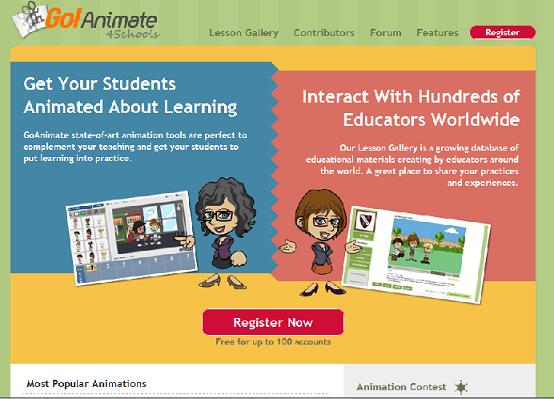
GoAnimate - website to create animated videos

Scribblitt - website that allows students to write and publish their own books

Storykit (Free) - application for creating electronic storybooks

Storyrobe- ($0.99) application for creating digital stories using movies and images

iMovie - Desktop and mobile device application ($4.99) for making film

Story Wheel (Free) - Create a story by choosing images, choosing characters and recording narrative

Puppet Pals (Free) - iPad app to create animated movies

Little Bird Tales - website for younger students to create their own digital stories

Voice Thread (Free & paid) - web-based tool for narrating still images and creating collaborative stories
Whatever tool you use, always remember that the story comes first and digital tools come second.
Subscribe to:
Posts (Atom)