I reflected on the story My Life in Toronto by Ambar Sabah from the Center for Digital Storytelling.
What was your overall impression of what you saw?
My overall impression of this story was that it was a creative way to tell a story about finding a place to call home. Instead of using images or people or herself to set the stage for her story, I like that Ambar chose fish instead. Because the subject of the story was migration and community, it had the potential to be trite but the creative use of color breathed new life into it. The imagery of this story was meaningful and powerful.
How could it be used in education?
A story like this one would be excellent for teaching students about identity, migration and culture. It could serve as a conversation starter about student's own experiences about making friends, building a community and their experiences in a new place. That discussion could also build empathy among students in the classroom.
How would you assess what you just saw?
I would assess this story on its use of imagery and metaphor and the deeper meaning they brought to the story. The movement of the yellow fish created the speed for the story beginning with a faster speed to mirror the crowding and chaos of her life in Pakistan and still images to show stability once she began to build a life. This story was a very personal tale for the author told through the first person instead of a detached piece. The strength of the story comes from Ambar's ability to tell her own story. The lack of music in this story allows the audience to focus on the images and narration instead of being emotionally swayed by the music. Ambar's story is relatable because it is based on a common human experience.
Sunday, September 11, 2011

Friday, September 9, 2011
The Power of Perseverance
 |
| Image by Don Fulano |
My Digital Media Production and Storytelling class is experimenting with the use of the iPad as a media production tool as opposed to solely using it for media consumption. Using it for the first time didn’t go so smoothly: we kept getting kicked off the wireless, the lack of Flash made it difficult to view some sites and it shows your password as you enter it which is a problem when you’re projecting it on a screen to an entire class. Despite all these issues, for the second class we decided to persevere and try it again and surprisingly enough, it went much better the second time around; we even worked out some of the kinks of using an iPad with our classroom management site.
My take-away from this experience: You can’t learn how well (or terribly) something works unless you use it... and try it again. Our class would have never learned some of the glitches with the iPad for production and presentation if we hadn’t continued using it. We may have more issues and problems with it as the semester progresses but it all serves as a learning experience. Technology frustration is common. Sometimes technology doesn’t work the way we want it to; websites won’t load, applications crash or complicated assembly is required. It is easy to forget that there is a learning curve with technology and if you stick with it, sometimes you’ll be able to add a new tool to your arsenal. On the other hand, you might decide that a certain piece of technology doesn’t fit your objectives but at least you know that you tried.
Wednesday, September 7, 2011
Resources for Digital Storytelling
For teachers interested in incorporating digital storytelling into their curriculum, there are free and cheap tools you can use. Here are a few that I really like:

GoAnimate - website to create animated videos

Scribblitt - website that allows students to write and publish their own books

Storykit (Free) - application for creating electronic storybooks

Storyrobe- ($0.99) application for creating digital stories using movies and images

iMovie - Desktop and mobile device application ($4.99) for making film

Story Wheel (Free) - Create a story by choosing images, choosing characters and recording narrative

Puppet Pals (Free) - iPad app to create animated movies

Little Bird Tales - website for younger students to create their own digital stories

Voice Thread (Free & paid) - web-based tool for narrating still images and creating collaborative stories
Whatever tool you use, always remember that the story comes first and digital tools come second.
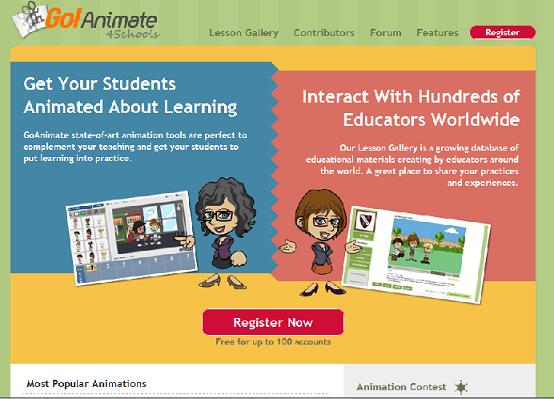
GoAnimate - website to create animated videos

Scribblitt - website that allows students to write and publish their own books

Storykit (Free) - application for creating electronic storybooks

Storyrobe- ($0.99) application for creating digital stories using movies and images

iMovie - Desktop and mobile device application ($4.99) for making film

Story Wheel (Free) - Create a story by choosing images, choosing characters and recording narrative

Puppet Pals (Free) - iPad app to create animated movies

Little Bird Tales - website for younger students to create their own digital stories

Voice Thread (Free & paid) - web-based tool for narrating still images and creating collaborative stories
Whatever tool you use, always remember that the story comes first and digital tools come second.
Wednesday, August 31, 2011
Starting the Semester with 20%

Friday, August 26, 2011
The Craziness of Steve Jobs
In the wake of Steve Jobs resigning Apple's CEO, his quotes have been widely spread from social media sites to news channels. I have read plenty of these the last few days but none have touched me as much as this one:
"Here's to the crazy ones. The misfits. The rebels. The troublemakers. The round pegs in the square hole. The ones who see things differently. They're not fond of rules. And they have no respect for the status quo. You can quote them, disagree with them, glorify or vilify them. About the only thing you can't do is ignore them. Because they change things. They push the human race forward. And while some may see them as the crazy ones, we see genius. Because the people who are crazy enough to think they can change the world, are the ones who do."
Go on and dream; be a little crazy; color outside the lines. You never know the impact it could have.
"Here's to the crazy ones. The misfits. The rebels. The troublemakers. The round pegs in the square hole. The ones who see things differently. They're not fond of rules. And they have no respect for the status quo. You can quote them, disagree with them, glorify or vilify them. About the only thing you can't do is ignore them. Because they change things. They push the human race forward. And while some may see them as the crazy ones, we see genius. Because the people who are crazy enough to think they can change the world, are the ones who do."
Go on and dream; be a little crazy; color outside the lines. You never know the impact it could have.
Wednesday, August 17, 2011
A Week of Google Goodness
Last week I had the opportunity to be a teaching assistant for a week long Google workshop for a small group of educators. The workshop was an excellent chance to share Google tools while learning about tools that I hadn't used myself. The biggest thing I took away from this week is that as an educator, you don't have to have all the answers. Discussions and sharing resources led to the teachers learning new and innovative ways to implement Google tools in their classroom. My hope is that as all of these teachers prepare for the upcoming school year that they implement these tools, tricks and tips to increase student engagement and love of learning.
Here are the two presentations I did on Google+ and Google Mobile:
Here are the two presentations I did on Google+ and Google Mobile:
Thursday, August 4, 2011
Scoop.it - A Great Tool for Curating
After attending an amazing presentation at ISTE, I have been really fascinated by digital curation. What is digital curation? According to Wikipedia, it is "the process of establishing and developing long term repositories of digital assets for current and future reference by researchers, scientists, historians, and scholars." Of all the tools I learned about for curating, my favorite is scoop.it.
What is it? Scoop.it is a platform that allows users to collect media centered around a specific topic. Once a topic is created Scoop.it searches for and suggests content that matches that topic. This content can also be shared on social networking sites such as Twitter and Facebook. My favorite feature of scoop.it is the "scoop it" button that can be added to your web browser allowing you to quickly add the websites you're viewing to your page. Students can even create their own pages and begin building their own curation skills.
Scoop.it in the Classroom: Scoop.it is a great way for teachers to accumulate resources on a particular topic. First, they create the topic. Then, they search scoop.it's suggested content, the Internet or their social bookmarking site to find all the websites that pertain to that topic and add it to their collection. Now, they have one place for all of their resources that students can go to. Teachers can even follow other topics and find content to add to their own page.
Here is a sample of one I've built on the future of storytelling:

What is it? Scoop.it is a platform that allows users to collect media centered around a specific topic. Once a topic is created Scoop.it searches for and suggests content that matches that topic. This content can also be shared on social networking sites such as Twitter and Facebook. My favorite feature of scoop.it is the "scoop it" button that can be added to your web browser allowing you to quickly add the websites you're viewing to your page. Students can even create their own pages and begin building their own curation skills.
Scoop.it in the Classroom: Scoop.it is a great way for teachers to accumulate resources on a particular topic. First, they create the topic. Then, they search scoop.it's suggested content, the Internet or their social bookmarking site to find all the websites that pertain to that topic and add it to their collection. Now, they have one place for all of their resources that students can go to. Teachers can even follow other topics and find content to add to their own page.
Here is a sample of one I've built on the future of storytelling:

Subscribe to:
Posts (Atom)